
Download Rune Translator - Write Runic – Runic Alphabet, Runes, Ancient Language, Transliteration Tool
Overview
Rune Translator - Write Runic is a specialized Android application designed to help users convert standard English text into runic script. The software serves as a digital tool for individuals interested in Norse mythology, ancient languages, or personal expression through historical writing systems. By offering a straightforward transliteration function, it enables users to transform everyday phrases into runic characters, making it a valuable resource for educational exploration and creative projects. The app is particularly useful for hobbyists, students of linguistics, and enthusiasts of ancient Nordic cultures who wish to engage with the runic alphabet in a practical way.
Target users include those exploring historical writing systems, individuals creating themed content for personal or artistic purposes, and learners of early Germanic scripts. The software operates entirely within the Android ecosystem, providing a lightweight solution for on-the-go access to runic transliteration. While the developer, Word Checker Apps, is not widely known in the broader software market, the app’s focus on a niche but growing interest in ancient languages suggests a dedicated user base. Real-world applications range from personal journaling in runes to crafting authentic-looking inscriptions for themed events or digital art.
Key Features & Capabilities
- Runic Transliteration Engine – Converts standard English letters into corresponding runic characters based on the Elder Futhark alphabet. This core functionality allows users to type any English text and instantly receive a runic version.
- User-Friendly Interface – Designed with simplicity in mind, the app features a clean input field and clear output display, enabling quick and intuitive use without requiring prior knowledge of runic writing.
- Real-Time Translation – As users type, the app generates the runic equivalent in real time, allowing for immediate feedback and iterative refinement of text.
- Text Export Functionality – Users can save or share their runic translations via common Android sharing methods, facilitating integration with other apps or social media platforms.
- Offline Accessibility – The application does not require an internet connection to function, ensuring usability in any environment, including remote or low-connectivity areas.
These features support both educational and creative workflows. For example, a student studying Norse history might use the app to practice writing runic forms of key vocabulary. Similarly, a digital artist could generate runic text for a themed poster or tattoo design. The app’s focus on accuracy and ease of use makes it a reliable tool for non-technical users seeking authentic runic representation.
User Interface, Workflow & Performance
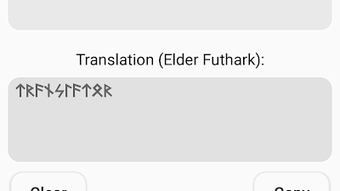
The user interface of Rune Translator - Write Runic follows a minimalist design approach, prioritizing functionality over visual complexity. The main screen consists of a single input field for English text and a dedicated output area displaying the corresponding runic script. Navigation is limited to typing and viewing results, with no additional menus or settings visible in the basic version. This streamlined layout reduces cognitive load and supports rapid task completion.
Workflow efficiency is high for its intended purpose: entering text and receiving immediate runic output. The real-time translation feature ensures minimal delay between input and display, contributing to a smooth user experience. However, the developer did not specify resource usage details, so exact performance behavior, such as CPU or RAM consumption, remains unknown. Stability appears to be consistent within the scope of its functionality, though no user-reported crash rates or error logs were provided. The app’s lightweight size of 12.4 MB suggests efficient memory management, but definitive performance claims cannot be made without further testing data.
Compatibility & System Requirements
Rune Translator - Write Runic is designed for the Android operating system, with version 1.0 released on June 18, 2024. The application has a file size of 12.4 MB, indicating a compact footprint suitable for devices with limited storage. The developer did not provide additional system requirements, such as minimum Android version, processor specifications, or RAM thresholds. As a result, compatibility details beyond the OS are limited. Users should verify device compatibility through the Google Play Store before installation.
Platform compatibility information is partially provided, with the app confirmed to run on Android devices. However, exact device support ranges, including older or newer models, were not disclosed. The app does not appear to require root access or special permissions beyond standard storage and network access for sharing. The lack of detailed system requirements means users must rely on general Android compatibility guidelines when assessing suitability for their devices.
Pros and Cons
Pros
- Simple and intuitive interface ideal for beginners and casual users.
- Real-time transliteration enables immediate feedback and creative experimentation.
- Offline functionality ensures consistent performance without internet dependency.
- Compact size of 12.4 MB makes it suitable for devices with limited storage.
- Free to download and use, with no in-app purchases or ads mentioned.
Cons
- Limited to English-to-runic transliteration; no support for other languages.
- No advanced customization options for runic styles or alphabet variants.
- Limited information on system requirements and compatibility.
- Only available on Android; no versions for iOS, Windows, or Mac.
- Does not include educational content such as pronunciation guides or historical context.
FAQ Section
Is Rune Translator - Write Runic available for iOS devices?
The app is currently only available for Android. There is no official version for iOS or other operating systems at this time.
Does the app require an internet connection to work?
No, Rune Translator - Write Runic functions entirely offline. Users can translate text without needing an active internet connection.
Is the software safe to download and use?
As the app is distributed through the Google Play Store and is free from known malware, it is considered safe for standard use. Users should only install it from official sources.
How often are updates released for the app?
Specific update frequency was not provided. The current version is 1.0, released on June 18, 2024.
Can I use the app to translate languages other than English?
Based on available information, the app only supports English text input. Transliteration of other languages is not currently available.
Final Thoughts + CTA
Rune Translator - Write Runic delivers a focused and reliable solution for converting English text into runic script. Its clean interface, real-time translation, and offline capabilities make it a practical tool for both educational exploration and creative expression. While it lacks advanced features and cross-platform availability, its simplicity and free access position it as a solid choice for users interested in the runic alphabet. The app is especially beneficial for hobbyists, educators, and fans of ancient Nordic culture who seek a straightforward way to engage with historical writing systems. For those looking to experiment with runes without complexity, this tool offers a seamless experience.
Download Rune Translator - Write Runic now







